Extension Template Catalog
Overview
The extension template catalog is a remote, versioned list of Candescent-maintained starters for mobile widgets. Use these vetted project layouts when you want a faster path than a blank offline scaffold. The generator downloads the latest catalog, allows you to pick a widget template, and produces a runnable Nx project wired for @cdx-extensions/di-sdk (PlatformSDK) and the mobile sandbox.
- Run all commands below from your cdx-extensibility-apps (or FI monorepo) root.
- Use pnpm.
- Run
pnpm run setup(orpnpm add @cdx-extensions/extension-generator-mobileif the generator is not already a workspace dependency). - Run the Nx commands below with
pnpm exec nx. - For additional information, see pnpm run vs pnpm exec.
For full-screen mobile features, see Features — Extension Template Catalog.
Browse the Catalog
Templates are added to the catalog on an ongoing basis. See the full, up-to-date set at generation time (interactive prompts) or with the list commands below.
Setup
pnpm exec nx run list-mobile-widget-templates
pnpm exec nx run list-mobile-templates
These commands fetch the same remote catalog the generators use and print entries grouped by type and category.
Example: Investment Portfolio (Data Chart)
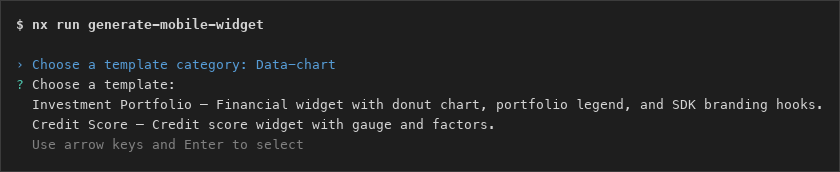
Browse — category and template picker:
$ pnpm exec nx run generate-mobile-widget

? Choose a template category: › Data-chart
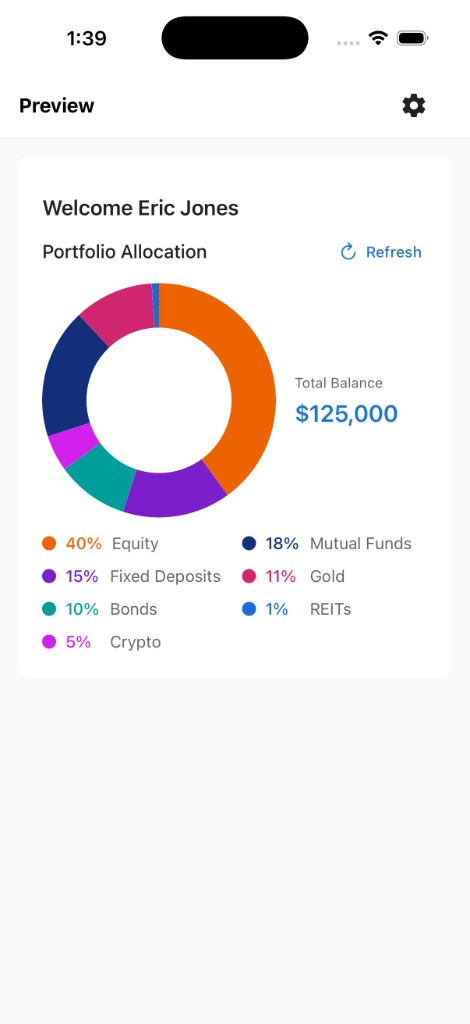
? Choose a template: › Investment Portfolio — Financial widget with donut chart, portfolio legend, and SDK branding hooks.
? Enter your FI Id (digits only, e.g. 0123): › 0123
? Choose a name for your widget (kebab-case, e.g. acme-portfolio): › acme-portfolio
Outcome — generated widget in the mobile sandbox:
Template ids, categories, and counts change as Candescent publishes new starters. Use pnpm exec nx run list-mobile-widget-templates or the interactive generator for the current catalog.
Generate Your Widget
Interactive (widget flow)
pnpm exec nx run generate-mobile-widget
Equivalent:
pnpm exec nx g @cdx-extensions/extension-generator-mobile:widget
You can also start from the type picker and choose widget:
pnpm exec nx run generate-mobile-extensions
Flow:
- Fetches the latest catalog from the remote URL (with cache and local fallbacks).
- Lists widget templates grouped by category (or prompts for type first when using
generate-mobile-extensions). - Prompts you to pick a category, then a template.
- Prompts for your FI Id and widget name.
- Optionally prompts for mock API
baseUrlandapiPathwhen the template supports it. - Downloads the selected npm template package and scaffolds the project.
| Workspace command | Underlying generator |
|---|---|
pnpm exec nx run generate-mobile-widget | @cdx-extensions/extension-generator-mobile:widget |
pnpm exec nx run generate-mobile-extensions | @cdx-extensions/extension-generator-mobile:generate |
Non-Interactive / CI Usage
Pass generator options after --:
pnpm exec nx run generate-mobile-widget -- --template=investment-portfolio --fiId=0123 --name=acme-portfolio
pnpm exec nx run generate-mobile-widget -- --template=investment-portfolio --fiId=str:03100 --name=acme-portfolio
| Option | Required | Description |
|---|---|---|
fiId | Yes | Numeric FI id — digits only (0-9); 4 or 5 digits (e.g. 0123, 03100). Values shorter than 4 digits are zero-padded (123 → 0123). Leading zeros on 5-digit IDs are preserved. If Nx/yargs coerce --fiId=03100 to a number, quote it (--fiId="03100") or use --fiId=str:03100. |
name | Yes | Widget slug in kebab-case |
template | Yes | Catalog template id (discover ids with pnpm exec nx run list-mobile-widget-templates) or full npm package name |
noCache | No | Re-download catalog and template overlays (skip ~/.cdx/cache) |
catalogUrl | No | Override remote catalog URL |
directory | No | Output parent (default widgets/mobile) |
sandboxPath | No | Sandbox auto-wiring (default playground/mobile-sandbox) |
baseUrl | No | Mock API origin (widgets with config.ts.tmpl only) |
apiPath | No | Mock API path (widgets with config.ts.tmpl only) |
skipApiValidation | No | Skip live HTTP validation during generation |
What You Get
In addition to extension source from the selected template package, the generator writes CDX project scaffold files:
package.json,project.json,tsconfig.jsonsrc/index.ts, component entry file, and branding types
Output path:
- Widgets →
widgets/mobile/<name>/
The generator also auto-wires the new project into playground/mobile-sandbox so you can preview immediately.
Only modify files inside src/ for your widget logic and UI. See Getting Started for the full editability guide.
Advanced
Optional reference for troubleshooting and CI. Most users can skip this section.
Catalog source and cache
On each run the generator syncs catalog/extension-templates.json in this order: remote URL → ~/.cdx/cache/catalog/ → local workspace catalog/extension-templates.json.
Use --noCache after a platform publish if you need a fresh catalog or template overlay. Override the catalog URL with CDX_EXTENSION_CATALOG_URL or --catalogUrl when directed by support.
Template packages are cached under ~/.cdx/cache/<package>@<version>/dist/.
Mock API URL (config.ts templates)
Templates that ship config.ts.tmpl with baseUrl and apiPath trigger a mock API flow during generation. The generator reads defaults from that file, optionally validates the response when mockApiContract is set, and patches the generated widget's src/config.ts.
Supported mockApiContract values: portfolio-allocation, credit-score.
pnpm exec nx run generate-mobile-widget -- \
  --template=investment-portfolio --fiId=0123 --name=acme-portfolio \
  --baseUrl=https://candescent.wiremockapi.cloud \
  --apiPath=/investment-portfolio

pnpm exec nx run generate-mobile-widget -- \
  --template=investment-portfolio --fiId=0123 --name=acme-portfolio \
  --skipApiValidation
Next Steps
- Getting Started — Offline starter vs catalog, editability, and project layout
- Mobile Playground — Preview generated widgets locally
- Platform Capabilities (Local) — How local development works with mock data
- Host App Integration — Repository structure and submission process
- Features — Extension Template Catalog — Full-screen feature templates